IT Asset Pickup Process: 8 Steps From Pickup to Final Disposition | Prime Asset Recovery
The IT asset pickup process raises the same question for most IT managers and compliance officers: once the equipment leaves our building, what actually happens to it?
It’s a fair question — and one that matters. Whether you’re retiring a server room, refreshing employee laptops, or decommissioning a data center, the chain of custody on your equipment directly affects your data security and regulatory compliance posture.
The full process below applies to clients requiring complete ITAD documentation and asset tracking. For clients who only need a Certificate of Data Destruction or Certificate of Recycling, the process is streamlined accordingly.
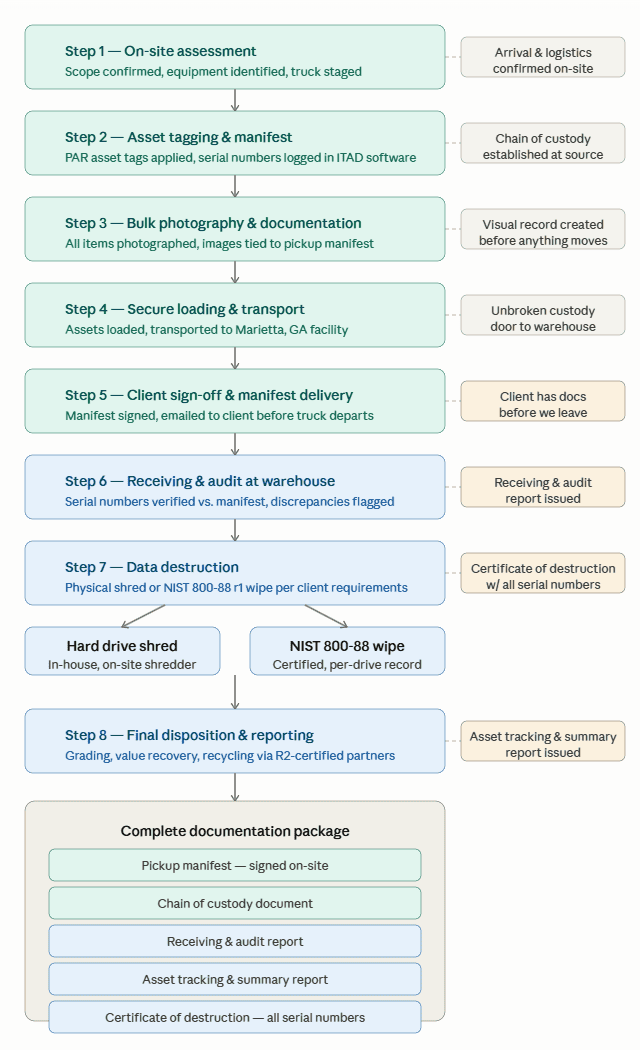
Here’s exactly what the process looks like when Prime Asset Recovery handles a full business pickup.
Need to schedule an IT asset pickup in Atlanta? Contact us to discuss your requirements — no commitment required.
Step 1: On-Site Assessment and Equipment Identification
When our team arrives at your facility, the IT asset pickup process begins with an assessment of the items slated for pickup. Before anything is moved, we confirm scope — what’s included, what’s not, and whether there are any special handling requirements based on your organization’s data destruction or tracking needs.
From there we pull the appropriate equipment from the truck: carts, pallet jacks, anti-static packaging, whatever the job requires.
Step 2: Asset Tagging and Manifest Entry
For clients who require asset tracking, each item gets a PAR Asset Tag created on-site and entered into our ITAD management software before it leaves your floor. Device type, manufacturer, and serial numbers are recorded at this stage.
This establishes the chain of custody at the source — not after the fact back at our warehouse. Every item is accounted for while it’s still in your building. This is what separates a documented IT asset pickup process from a simple equipment removal.
Step 3: Bulk Photography and Manifest Documentation
Once all assets are tagged and logged, we photograph everything — bulk photos of the full pickup tied directly to the manifest. This gives you a visual record of what left your facility.
Nothing is loaded onto the truck until it’s documented.
Step 4: Secure Loading and Transport
Assets are securely loaded and transported to our facility in Marietta, GA. Equipment is handled carefully throughout — maintaining an unbroken chain of custody from your door to ours.
Step 5: Client Signature and Pickup Manifest
Before we leave your site, the pickup manifest is finalized and signed by your authorized representative. A signed copy is emailed to you on the spot — you have documentation in hand before our truck pulls out of your parking lot.
We also make sure your space is left clean. If we moved anything to stage it for pickup, it goes back. No mess left behind.
Step 6: Receiving and Audit at Our Marietta Facility
When equipment arrives at our warehouse, it goes through a formal receiving process. Serial numbers are verified against the pickup manifest and any discrepancies are flagged immediately.
You’ll receive a Receiving & Audit Report once your items have been checked in — confirmation that everything that left your facility arrived at ours.
Step 7: Data Destruction — Shredding or Certified Wipe
This is where the process branches based on your requirements.
If you require physical destruction: Drives are removed from each device individually and fed through our in-house shredder at our Marietta facility. There is no off-site transport of your drives to a third-party destruction vendor — it happens under our roof.
If NIST 800-88 r2 wipe is acceptable: Drives are wiped in-device using a process that meets NIST SP 800-88 Revision 2 standards. A certificate is generated for each drive with the serial number recorded.
Both methods result in a Certificate of Destruction listing every drive serial number processed.
Step 8: Processing, Final Disposition, and Reporting
Once data destruction is complete, assets move through final processing — condition grading, value assessment, and disposition routing through resale, parts recovery, or responsible recycling via our R2-certified downstream partners.
You receive a complete Asset Tracking & Summary Report documenting every item’s final disposition.
Who Needs Full ITAD Documentation?
Any organization handling regulated data benefits from a documented IT asset pickup process and complete audit trail. This typically includes:
- Healthcare organizations subject to HIPAA
- Financial firms under SEC, FINRA, or state data protection requirements
- Legal practices and government contractors
- Any business that has experienced a data breach and needs to demonstrate due diligence going forward
If your industry appears on that list, the documentation package below isn’t optional — it’s what your auditor will ask for.
Planning an upcoming IT refresh or equipment retirement? Request a free assessment and we’ll walk you through the process before you commit to anything.
What You Receive When It’s All Done
Here’s the complete documentation package a typical full ITAD client receives:
- Pickup Manifest — signed on-site at time of pickup
- Chain of Custody Document — available for clients who require it
- Receiving & Audit Report — confirms all items arrived at our facility
- Asset Tracking & Summary Report — final disposition for every item
- Certificate of Destruction — serial numbers for every drive destroyed or wiped
For industries with strict data handling requirements — healthcare, finance, legal, government contractors — this documentation package is what makes an ITAD vendor audit-ready.
Ready to Schedule a Pickup?
A lot can go wrong between “equipment leaves your building” and “data is confirmed destroyed.” Gaps in documentation, untracked assets, and third-party handoffs all create liability.
The process above is designed to close every one of those gaps. If you’re planning an IT refresh, office move, or data center decommission in the Atlanta metro area, contact us to discuss your pickup requirements.
Ready to schedule your IT asset pickup in the Atlanta metro area? Request a free assessment